Crystade Update: JavaScript Assertions, Auto-Incident Lifecycle, and Rich Incident Responses
August 20, 2026
·5 min read
·
We’re excited to announce a major update to Crystade’s monitoring capabilities, released on August 20, 2026. This update focuses on making advanced monitoring checks easier to write, reducing alert fatigue through smarter incident automation, and improving team collaboration during incidents.
Here’s what’s new:
Monitor assertions now use JavaScript instead of a custom DSL
Assertions are team-scoped and linkable to multiple monitors
Custom incident titles, messages, and severity per assertion
Automatic incident opening and closing based on assertion health, with hysteresis to reduce false alarms
A WYSIWYG editor for incident responses, supporting rich formatting and cross-resource mentions
Let’s dive into each change and what it means for you.
Monitor Assertions with JavaScript
Previously, Crystade used a custom scripting language called Rice for writing custom check logic. While powerful, Rice required learning a niche syntax, which slowed down adoption and made debugging harder.
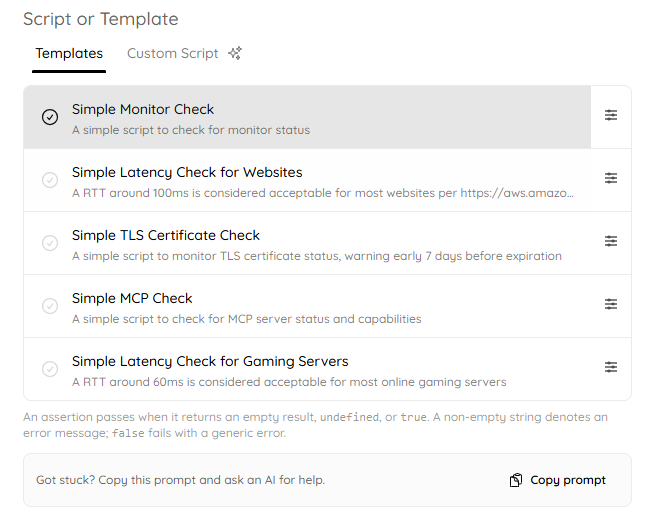
Today, we replace Rice with standard JavaScript for writing assertions. An assertion is a small program that evaluates a monitor’s check result and returns true (healthy), false or error message (failure).
Here’s a simple assertion that fails if the round-trip time (RTT) exceeds 100 ms:
return context.error === null && context.metadata.rttMs > 100;Another assertion that returns an error message:
let tlsLayer = null;
for (const layer of context.metadata.layers) {
  if (layer.name === "tls") {
    tlsLayer = layer;
    break;
  }
}

if (tlsLayer === null) {
  return "no TLS layer found";
} else if (context.error !== null) {
  return `error: ${context.error.message} (code: ${context.error.code})`;
}
Why JavaScript?
Huge developer pool – JavaScript is one of the most widely known programming languages. Your team already knows it.
AI-assisted development – You can ask Claude, ChatGPT, Gemini, or any AI coding assistant to help write and debug assertions.
Easier onboarding – New team members can start writing custom checks in minutes, not days.
Team-Scoped and Reusable
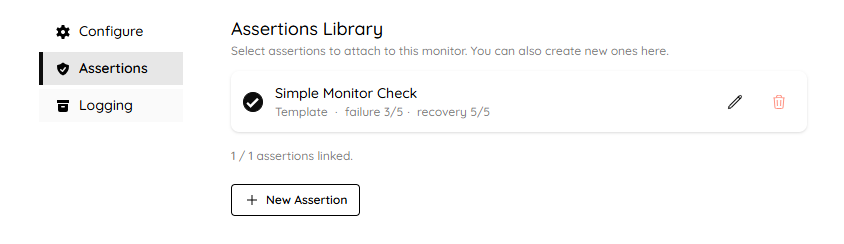
Assertions are now first-class, team-scoped resources. You can create an assertion once and link it to multiple monitors. No more duplicating script logic across checks.
Update an assertion, and all linked monitors pick up the change automatically (within a few minutes, consistent with monitor update propagation).
Manage assertions centrally from your team dashboard.
Plan Limits
The number of assertions you can create depends on your subscription plan:
Plan | Maximum assertions |
|---|---|
Free | 1 |
Starter | 3 |
Standard | 5 |
Customized Incident Notifications
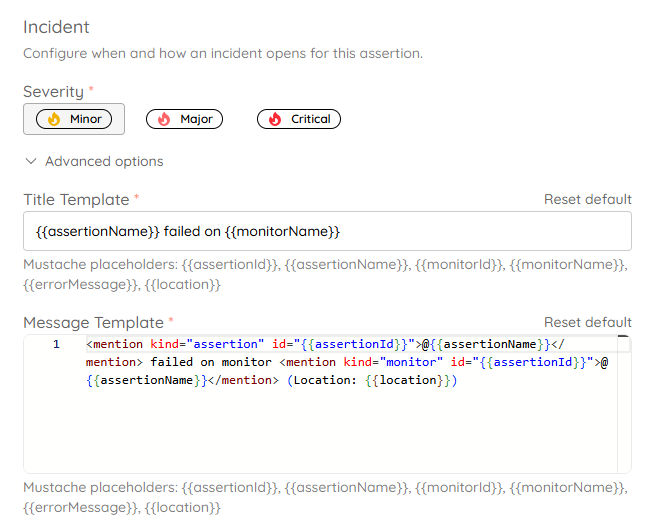
When an assertion fails, Crystade automatically creates an incident. Now you can customize exactly how that incident appears to your team:
Incident Title Template
Define a title using placeholders like {{assertionName}} and {{monitorName}}.
Example:
{{assertionName}} failed on {{monitorName}}This produces a clear, actionable title: “High latency check failed on API Gateway”.
Incident Message Template
Create a rich message body with HTML-like tags and mentions. Placeholders include {{assertionId}}, {{assertionName}}, {{monitorName}}, and {{location}}.
Example:
<mention kind="assertion" id="{{assertionId}}">@{{assertionName}}</mention> failed on monitor
<mention kind="monitor" id="{{assertionId}}">@{{assertionName}}</mention> (Location: {{location}})
These templates help your team instantly understand what broke, where, and which assertion triggered the alert.
Incident Severity
Assign a severity level (e.g., INFO, WARNING, CRITICAL) to each assertion. This ensures high-priority issues get immediate attention while low-priority anomalies are handled later.
Automatic Incident Lifecycle with Hysteresis
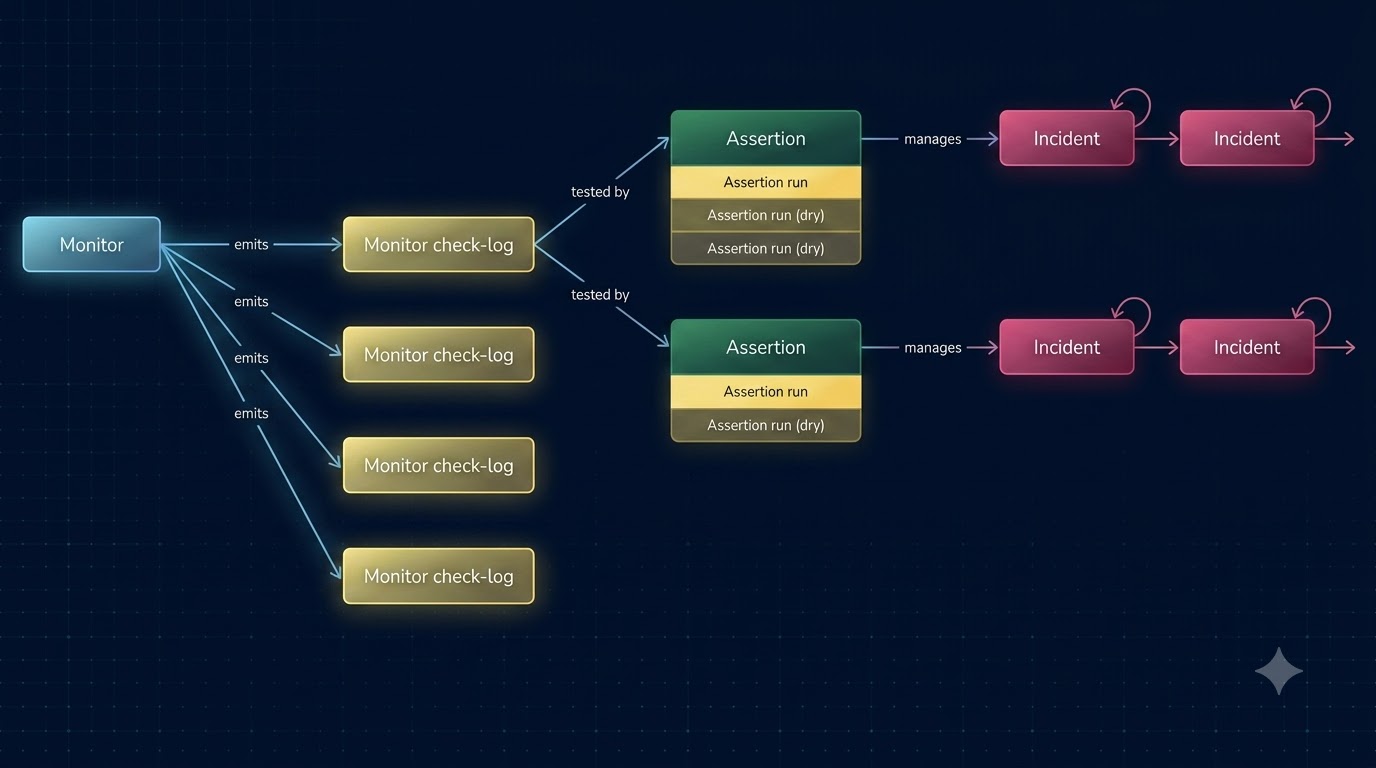
Monitoring often produces noisy data – a single failed check may be a transient network blip, not a real outage. To avoid alert fatigue, Crystade now manages the full incident lifecycle automatically based on assertion health.
Here’s how it works:
When an assertion transitions from healthy to failure, Crystade opens an incident.
When the assertion returns to healthy, Crystade closes the incident.
To tolerate inaccuracies, we use a K-out-of-N windowed hysteresis algorithm.
What is hysteresis?
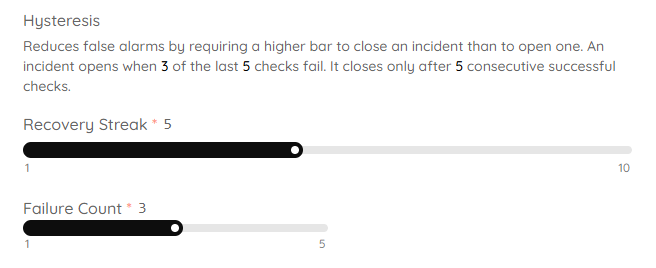
Hysteresis means the threshold to open an incident is different from the threshold to close it, preventing rapid open/close cycles (flapping). The algorithm uses three configurable parameters:
failure_count– number of failed checks required to open an incidentrecovery_streak– number of consecutive healthy checks required to close an incidentwindow_size– total number of recent checks considered
Constraints: 1 <= failure_count <= recovery_streak <= window_size <= 10
By default:
Trigger an incident after 3 failed checks out of 5 (
failure_count=3,window_size=5)Resolve an incident after 5 consecutive successful checks (
recovery_streak=5)
This means a temporary glitch won’t page your team, but a sustained outage will. And recovery requires a bit more evidence than failure, reducing the chance of premature closure.
Benefits
Less manual toil – no need to manually open or close incidents; Crystade handles it.
Fewer false positives – the hysteresis algorithm filters out transient noise.
Clear incident state – at most one incident is open per assertion-monitor pair, respecting hysteresis.
WYSIWYG Incident Response Editor
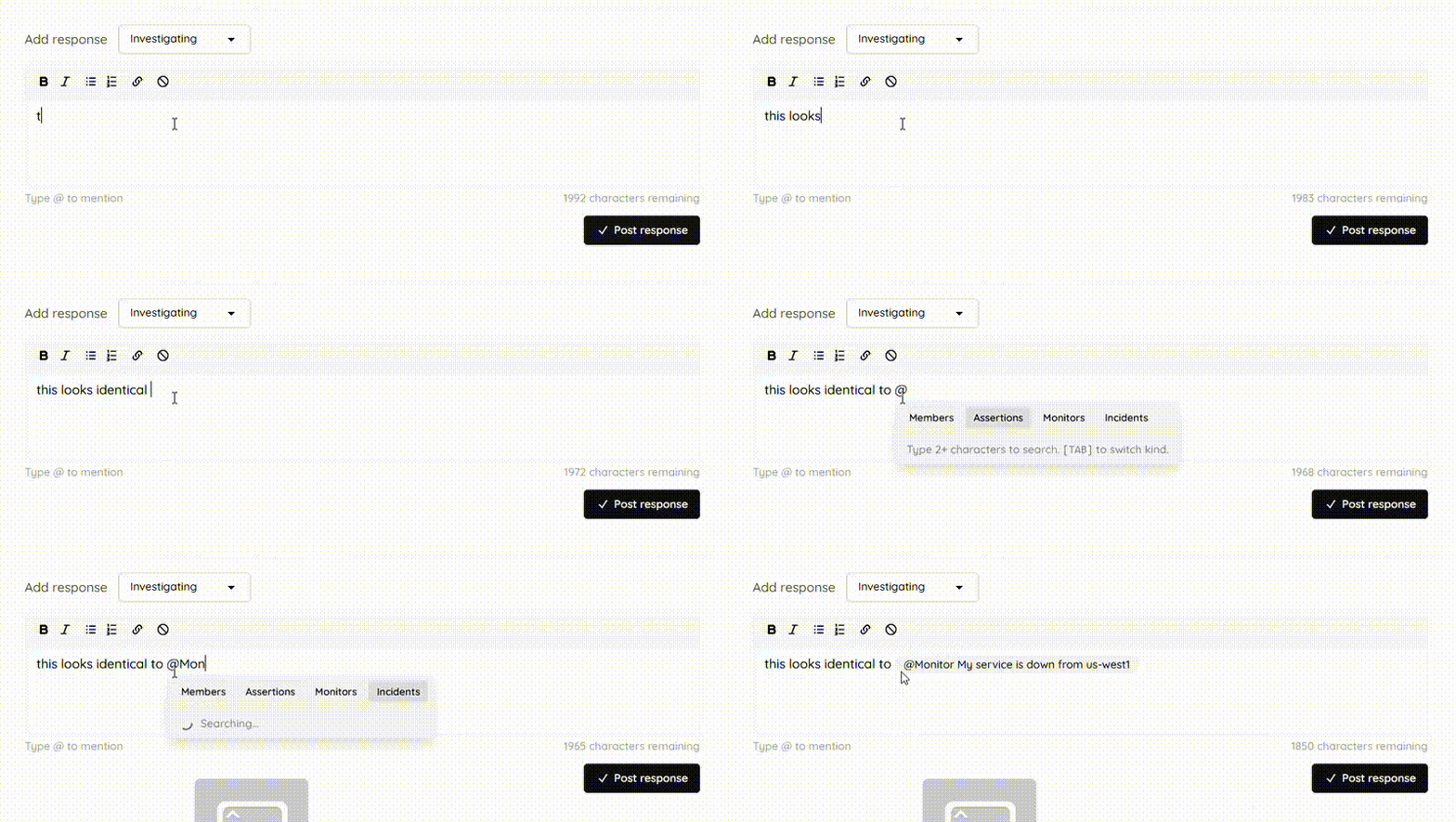
Collaborating during an incident is now much easier. We’ve added a WYSIWYG (What You See Is What You Get) editor for incident responses. You can:
Format text with headings, bold, italic, lists, and more
Mention team members, assertions, monitors, and incidents using
@or the mention picker
This improves communication by keeping all context inside the incident timeline. Instead of copying IDs or explaining which monitor failed, you can directly reference the resources involved.
Summary
This update makes Crystade’s monitoring more accessible, intelligent, and collaborative:
JavaScript assertions replace a niche DSL, lowering the barrier to custom checks.
Team-scoped assertions reduce duplication and simplify management.
Custom incident templates and severity give you full control over alerting.
Automatic incident lifecycle with hysteresis reduces noise and manual work.
Rich incident responses improve team coordination during outages.
Ready to try the new features? Sign in to Crystade or create a free account to get started. If you have feedback or questions, reach out to our support team – we’d love to hear from you.
Share this post
Related Posts
Keep reading from this category

Crystade Expands Global Monitoring with 8 New Locations
We’ve added eight new monitoring locations across the globe, powered by Google Cloud Platform. Discover how broader coverage gives you deeper visibility into regional outages and latency.

Crystade Now Supports Telegram & Zalo Alerts
Get instant monitoring and incident notifications directly in Telegram and Zalo. Crystade now offers webhook delivery to these popular chat platforms, alongside Discord and Slack.


3 New Developer Tools from Crystade: Cron, SLA, and Curl
Crystade launches three free utilities: a cron expression builder, an SLA downtime calculator, and a curl command generator. Simplify scheduling, understand uptime targets, and test APIs faster.
